Find a charger
Open the Wevolt app to find nearby chargers, filter by speed and features, and check live availability.

For drivers
Find a charger, plug in, tap to start, and pay automatically for the energy you use. Here's the quick version — and answers to the questions drivers ask most.
Get the app
Find chargers, start a session, and pay — all from your phone. Scan the code, or download from your store.


 Scan to download
 In the app
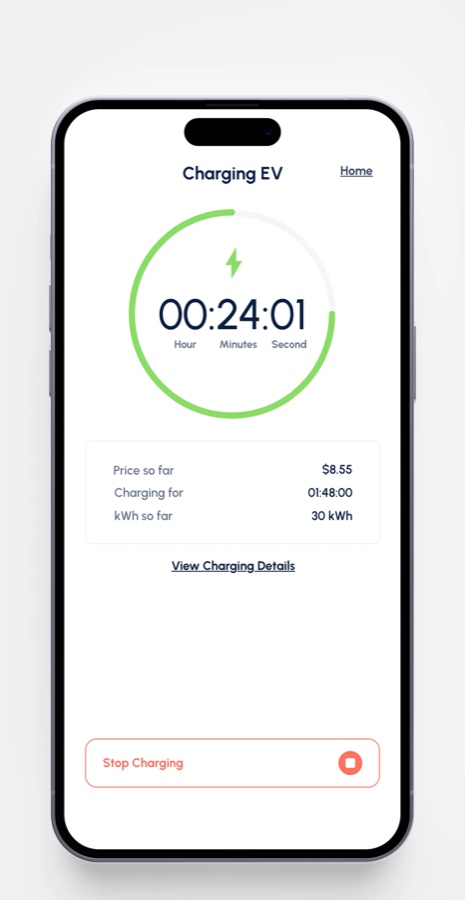
Start and stop a session, and watch your time, energy and cost update live — then pay automatically for exactly what you used.
In four steps
Open the Wevolt app to find nearby chargers, filter by speed and features, and check live availability.
DC fast chargers have a cable attached. At AC socket chargers, use your own Type 2 cable.
Tap to start in the app — no RFID card needed (a card is optional if you prefer tap-to-charge).
A temporary pre-authorisation hold verifies your card, then you pay only for the energy you use.
How the network works
Wevolt runs the app, the network and the payment system. The chargers themselves are owned and run by independent operators — businesses, councils, property owners and workplaces — who list them in the app and set their own prices.
In the app, the Help button on any station points you to the right person: the operator for anything at the charger (faults, stuck cables, access), or the Wevolt team for anything in the app or with a payment.
FAQ
Open the Wevolt app, select the charger and tap start. You don’t need an RFID card — it’s optional.
Read the full article →Payment is handled in the app. A pre-authorisation hold is placed on your card, then you’re billed for the energy used.
Read the full article →DC fast chargers have a cable attached. For AC socket chargers, bring your own Type 2 cable.
Read the full article →That’s a temporary pre-authorisation hold to verify your payment method. It’s released after your session.
Read the full article →If a session was charged incorrectly, contact Wevolt and we’ll review and refund where appropriate.
Read the full article →Some sites apply an idle fee if you stay plugged in after charging finishes, to keep bays free for others.
Read the full article →At a shared, load-managed site, power is shared across active chargers, so your speed can vary with demand — safely.
Read the full article →Use the Wevolt app to find nearby chargers, filter by speed and features, and see real-time availability.
Read the full article →